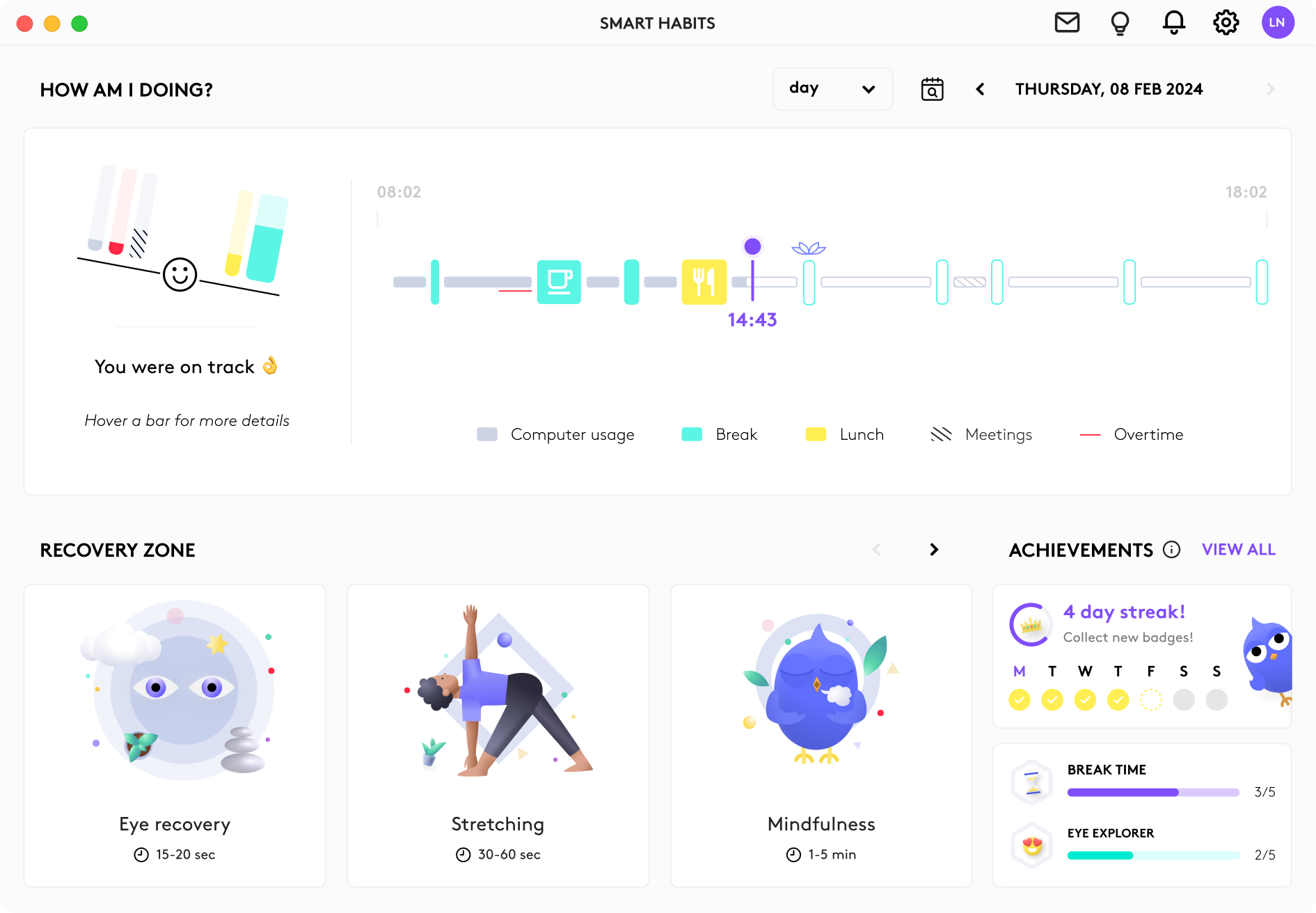
Keeping healthy work habits has never been easier!
— Smart habits is your best ally —
Keeping healthy work habits has never been easier!
— Smart habits is your best ally —"SmartHabits is going to be an absolute game changer for the workforce!"
Check out this video of award-winning osteopath Anisha Joshi, one of our experts, who helped us develop simple, discrete, yet effective exercises for your body.
Quite often, you overwork yourself without noticing it and you need a break to stay on top of your game. No need to stress and set timers, SmartHabits will remind you to take a pause at the perfect moment, and without disturbing you. Seems impossible? Then give it a try, satisfaction guaranteed!
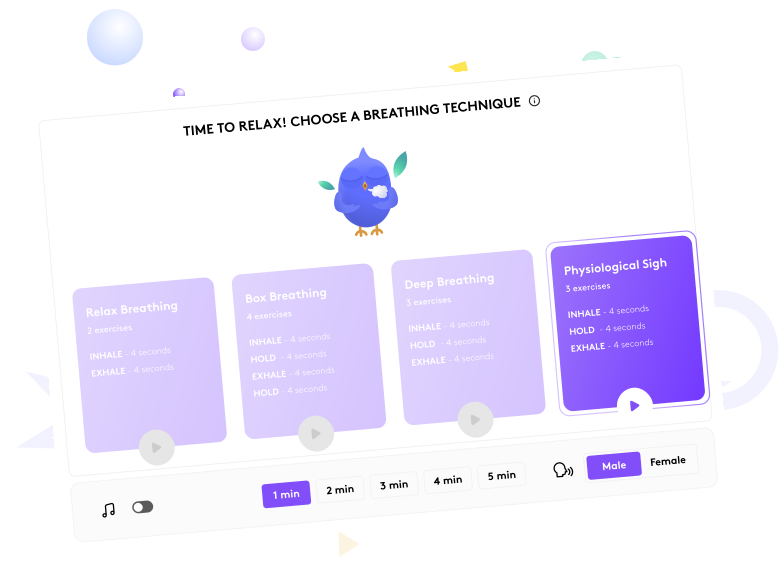
Becoming aware of an issue is good. Being guided to solve it is better! We worked with experts to design exercises that will help you rest your body and calm your mind. It’s never been so easy to include moments of relaxation that become part of your daily habits!

SmartHabits becomes your work companion throughout your day. It helps you identify break patterns, and give you key insights on how to improve them. With a single glance at the dashboard, you'll know which habits to improve, and which ones you’ve already mastered.
Packed agenda and no time left for breaks? Based on your upcoming meetings, our Smart Calendar Nudges give you the timely heads-up you deserve. No surprises, just a smoother workday and more effective meetings from start to finish.
Feel energized in the morning and relaxed in the evening. Simply connect your Logitech Litra Light and let SmartHabits do the magic. Watch your light automatically change brightness and color throughout the day to match your natural biological rhythm.
Ideally, you should take a 5-20 minute break every hour or so. Yes, you read it right, and here's why:

Your ability to focus and engage decreases drastically when you work continuously. Breaks act like resets, keeping your mental load and brain activity at healthy and sustainable levels. Not convinced? Check out this study, you’ll be surprised!

It’s counterintuitive but true! After a break, your attention is refreshed and you are more likely to dedicate fully to your tasks. That's the secret of the 10% most productive people. This result comes from a study conducted by DeskTime, over 40’000 people.

A break allows your eyes to rest and your entire body to relax and stretch. Moving increases blood flow to muscles that have been held in a static position, which helps prevent muscle fatigue, aches, and long-term health problems.
Meet some of the incredible Logitech employees and experts we work with to bring these solutions to life

Professor

Award-winning Osteopath

Chief Medical Advisor

MeetingScience Founder

HMI Specialist
“It can be anything that takes your mind away from work-related things and focuses it on something that you feel is relaxing” that will help you be refreshed and recharged when you start your next meeting

Find break activities that calm your mind but don't require your eyes to look at a screen

Studies show that physical activity such as walking brings lots of benefits also for mental health

Doodling or reading something enjoyable also help to reduce stress and relax

Meditation is one effective way to relax and recharge between meetings

I've been using SmartHabits for about 6 months now and I find it superior to similar apps I've been using previously. The killer feature for me is the detection of video calls that avoids the weird moment when your pomodoro app ticks while you are sharing your screen. I also like the unobstructive way it notifies breaks time. Cherry on the cake, the app proposes some activities (take a snack, do 5 mins breathing exercise...) which enforce good habits.
Software Development Manager
SmartHabits takes a simple and powerful user impulse... "When should I take breaks from my computer?" ...and wraps it up in a thoughtful, engaging, fun, and beautiful presentation. It's evident that SmartHabits is doing clever things behind the scenes to ascertain my work state - using system signals to classify the category of activity I'm in, and what type of intervention is most appropriate. Kudos to Team HITx!
Entrepreneur in Residence
I have realized that the best time for me to take a break is after my meetings just before I start a totally new task. It is fascinating to see the patterns that repeat over the weeks. For instance, I am doing generally worse on Mondays and I am planning to change my meetings for next year to see if I can improve my Mondays. I have just started to use the meditation sessions. I am hoping to use them when I see I have an overwhelming task at hand and I need to find the motivation to attack it.
Expert Engineer
SmartHabits is a discreet yet most useful little app that helps me be aware to take a short break when I'm not doing it. What I really like about it, is that if I still want to continue to work and not be distracted by the app notification, I just need to shake my mouse and voila, the notification is gone. On top of that, I can access advanced settings to know more about my breaks during the day. It adds another layer of understanding of my good or bad behavior or habits.
Principal Product Experience Designer
The timeline is clear, good looking and self explanatory, the notifications are non invasive and funny (I love the running plant) and it really helps me find a balance between my work and my free time/breaks, since sometimes I just get too involved in work I lose track of time.
Life Sciences Engineer
I already try to have breaks often and get some movement in my day but SmartHabits comforts me in the process. Sometimes I get in the flow of work and can't be bothered, but one shake of the mouse and the bubbles are gone for a bit. Very handy! The design is beautiful. I wish I had some numbers on how SmartHabits overall improved my productivity and wellbeing at the desk because I'm convinced it has. I would definitely recommend this app to anyone who works long hours on a computer.
Software Engineer

SmartHabits is for anyone who regularly spends time at their desk and wants a healthier and more effective way of working. It accommodates a wide range of preferences. Do you prefer an unobtrusive experience? Then silent notifications highlighting your screen edge are right for you! Would you prefer a more fun experience? Unleash the full range of original notifications to put a smile on your face and nudge you toward a smart break! Check out all the available settings in the app's preferences.
SmartHabits can intelligently understand your work state by analyzing keyboard, mouse and overall computer usage. It typically uses less than 1% CPU power (around 0.2% on average). While it does not require an internet connection to work, connecting to your Gmail or Office 365 calendar allows more personalized nudges. For full functionality including calendar integration, an internet connection is recommended.
Cloud storage enhances your SmartHabits experience. Now, your preferences, history, and data are securely stored in the cloud, allowing you to access them from any device. This ensures that no matter where you log in—at work, home, or on the go—your settings remain consistent, creating a seamless and personalized experience across all your platforms.
Your privacy is our priority. SmartHabits ensures that your data is securely stored and never shared or sold. Only you have access to your data, with strict access controls in place. We employ top-tier security measures to protect your information, and all usage data is anonymized so that it's never linked to personal identifiers. You also maintain full control over any integrations, like linking third-party calendar services, ensuring that you decide what gets connected.
In the app, use the always-available feedback form on your dashboard. Or email the team anytime at smarthabits@logitech.com - we respond to every message!
Absolutely not! Using smart detection technology, SmartHabits accurately identifies when you're in a meeting and will never disturb you (unless you ask it to nudge you during your meetings).
SmartHabits now offers more personalized nudges tailored to your routine, including special reminders for your birthday. You can also add your pets’ names to the app, and SmartHabits will include them in your nudges, making your reminders feel even more personal and engaging.
Multi-language support is coming soon.